Posts

Showing posts with the label mac

Edit Mail’s data detector iCal events directly in iCal

I didn’t mention it at the time, but a hint I sent in to Mac OS X Hints was accepted (for some reason, they list me as anonymous). What reminded me was it getting rementioned on Macworld. Technorati Tags: Leopard , Mac , Mac OS X Hints , Macworld

macosxhints.com - Prevent creation of the Mail To Do folder on IMAP servers

A post today on Mac OS X Hints handles something that has annoyed me with using Gmail IMAP with Leopard’s Mail.app. Specifically, there was an issue with To Dos : For a while I’ve been annoyed at Mail.app’s creation of the Apple Mail To Do folder on my IMAP server (I use Dreamhost). No matter what I did, it just wouldn’t stay gone. There’s this hint, and there are some thoughts in the comments, but no real fixes. I returned to my problem today, and found that by going into Mail » Preferences » Composing, I was able to solve the problem. In the ‘Create Notes & To Do’s in:’ drop-down menu, select On My Mac. Close the preferences, then delete the Apple Mail To Do folder on the server. That’s it! No more ‘Apple Mail To Do’ folder on the server; just locally. I added a comment to this for someone who was having trouble with this on Gmail, that after doing this, I: followed the steps above, quit Ma...

Blank Mac screensaver

Image
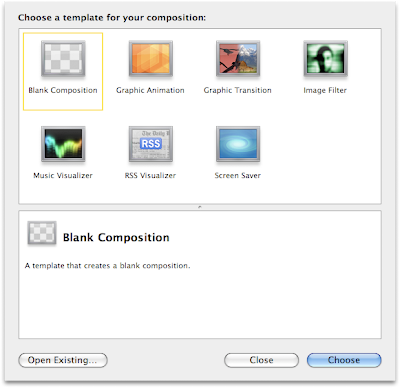
Thanks to FeedBurner , I can see how people (all two of them!) come upon my site. Frankly, the search terms are fascinating. One that has come up frequently enough is “blank mac screensaver”, and things like it. I thought this was odd, since I was certain that a blank screensaver came with Mac OS X. Well, I just looked, and not so. Since this is an easy one to help people with, I’ll demonstrate two ways to do it. The first is the easiest: go to the Versiontracker page for Blank Screen Saver . I haven’t tried it, but it looks like others like it and it does the seem to do what people want. But you can also make one yourself, using Quartz Composer ! To start, you want to make sure you have Apple ’s Developer Tools , which now come on an installation DVD with every Mac (I believe), or you can download from the developer site (after registering for free). Once you have the Developer Tools, open Quarts Composer, which is in /Developer/Applications . Now: Choos...

How to make a Mac screen saver that shows your uptime in Leopard

About nine months ago, I wrote about how to make a Mac screen saver to show your uptime , using Quartz Composer , a package from Fink , and Quartz Composer patch called Shell Command Patch . Not long after , Apple released Leopard , which seems to have changed Quartz Composer enough to break Shell Command. I was getting all geared up on writing a post about doing this using another method (completely redoing it and everything), but looking in to this further just showed me I’m an idiot. It turns out the difficulty I was having is that Quartz Composer patches are saved in different locations. To be clearer: In Tiger (10.4), patches are kept in /Library/Graphics/Patches/ . In Leopard (10.5), patches are kept in /Library/Graphics/Quartz Composer Patches/ or ~/Library/Graphics/Quartz Composer Patches/ . That’s it. Seriously. Incidentally, I found this information at Kineme.net’s page on the topic . The new version of the Developer Tools does in fact come with an example p...

BibDesk and QuickLook

Image
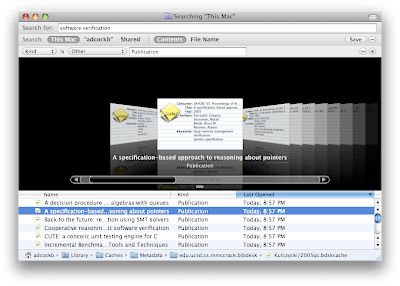
I have a strong need use BiBTeX files, but fortunately life is generally made a lot easier with BibDesk . As I only need to deal with bibliographies in spurts, invariably there’s a new version when I get started. I didn’t think Leopard would inspire any changes to BibDesk, but indeed it has. The first change I noticed is that it saves a file for each publication, so that Spotlight will play nicer with each one (notice how it is also using QuickLook to present it like a card from the card catalog: This turns out to be really useful. Almost immediately after messing with BibDesk again, I needed to search for an author. Interestingly, BibDesk uses a different QuickLook style if you use QuickLook proper: I actually have no idea how they pull that off, but it’s very nice. Looking at all the other features BibDesk has, it has become very clear to me I am a total novice with it (they have a whole page for AppleScripts! ). Technorati Tags: Leopard , Mac , QuickLook , BibDe...

SmartSleep 1.2

Almost a year and a half ago , I listed out a bunch of Mac applications that would be useful for some newly converted friends of mine. This is sorely in need of an update, but until then I’ll just occasionally post what others have to say. Macworld just covered SmartSleep , which can be great for people with laptops: Patrick Stein’s Smart Sleep, a System Preferences panel, lets you choose between four different sleep modes: Sleep and hibernate: Default mode. Sleep only: No RAM written to disk. Hibernate only: Power fully off. Smart sleep: A special mode whereby your machine will generally just sleep, but will sleep and hibernate when the battery is below a certain power level you specify via a slider. If the battery is below five percent charge, then it will only hibernate. After Apple made hibernation the default mode when closing a laptop, people are supposed to wait (up to a minute!) for it to finally go to sleep. This tool can be great for doing what rea...

Why ZFS Matters to Mac Users

I have been having a bit of an ongoing discussion with a friend over Time Machine. A lot of this has been about the problems Time Machine currently has, and where it can/should go. What little I know about ZFS has made me think it could play an important role. This kind of feeling usually tells me I need to learn more about a topic. Often it often means my initial suspicions are wrong, but so far there haven’t been any disappointments yet. Just today, I came upon the blog post “Why ZFS Matters to Mac Users”. It feels like I’ve read this before, but it’s relevance strikes more much more, now. Currently, the most notable to me is block-level checksumming to detecting errors the ability to handle snapshots efficiently and quickly Clearly, ZFS is much more than this, but with my mind on how Time Machine could be better those seem like useful thing to keep an eye out for as ZFS becomes much more prevalent in the Mac world. Technorati Tags: Mac , Time+Machine ...

Time Machine and Entourage

Image
Thanks to Entourage 2008, I finally got to try out Time Machine to do a restoration. Let me point out, first off, that I happen to like Entourage (and in fact, I’ve had a pretty favorable impression of Office 2008 in general). However, when I let it use iSync to handle my contacts, each one got duplicated. This problem can only occur (I think) if you tell Entourage to go to Preferences > Sync Services, and check “Synchronize contacts with Address Book and .Mac”, which is off by default. Today I decided to give Leopard’s iChat a try. I’ve been an Adium user for a few years now and would recommend it to anyone who asked, but I thought it was time to give iChat another try. That’s how I noticed there was something weird with my address book: both iChat and Adium use the address book to map AIM and Jabber contacts with actual names (obviously, Adium can handle a lot more than that). Mostly iChat saw what Adium was seeing, but due to a few various ...

Time Machine: Some Details - Murphy Mac

Infinite Loop on Ars Technica just put up a good summary of some recent posts about Time Machine . For my part, the most interesting one they mention is Time Machine: Some Details - Murphy Mac : I had recently been wondering about the two details brought up there, namely: How does Time Machine handle it if you rename a file? When Time Machine consolidates its hourly backups to daily, daily to weekly, etc., what does Time Machine decide to keep and what does it toss out? Fortunately, someone else was willing to do this, because I don’t think I’d ever have gotten around to looking in to it. So check it out if you’re interested. I left those questions unanswered here so as to not ruin the suspense… Technorati Tags: Apple , Leopard , Mac , repost , Time+Machine

A better SVN on a Mac

For a couple of projects, I’ve started using Subversion instead of CVS . I was never a big connoisseur of CVS, and there are plenty of people out there already extolling the virtues of SVN over CVS, so that’s not what this is about. Instead, I want to post a couple of things that help make SVN more “Mac-like” for me. I should point out that both of these have been done before, and really I’m only collecting together some details I’ve found. While I do tend to write my code in Xcode , due to the multi-platform nature of the projects I don’t actually use Xcode’s project format. Instead, I compile through Terminal .app and likewise manage SVN through it. As nice as the terminal is, it’s nice to have some more “graphical” interface when possible. Setting your $EDITOR The first change is to set the the $EDITOR environmental variable to an application of your choice: export EDITOR="/usr/bin/open -n -W -a /Applications...

Fun with Time Machine

So far, I have mainly been using Time Machine to do daily backups and have been playing around with it less so. My use of Time Machine is more so I can take up computer juggling, a lifelong dream of mine. I was , however, curious as to what kind of changes I have been making to a file. Having hourly differences would be nice, but is rather unnecessary. This is where Quick Look can become useful. With Quick Look if you have a file selected and hit the space bar, it shows a preview of the file. At its most basic, this is just file info. But for files that Quick Look knows about (such as text files, PDFs, iWork and Office files, and images) it will the actual document. This works in the Finder only; not in save dialogs or anything nice like that. Or at least, this is what I thought. It turns out, it also works in Time Machine. Thus, if I am looking at the file in question in Time Machine and hit spaces, I get a preview. If I go backward or forward in time, it gives me that time’s...
Interesting Leopard issue

I’ve just run in to an interesting issue between a change in the firewall in Leopard and Tiger. In Leopard, after you allow an application to have incoming connections, the application is digitally signed. On subsequent runs of the application, the signature is checked. If it is the same, all is good. Otherwise, the application isn’t allowed to launch (it appears). So what is here is what has recently happened: I have been using Skype just fine on Leopard for the last couple of weeks. A day or two ago I realized the firewall is not on by default (!) in Leopard, and turned it on. Today I launched Skype. Everything went fine (this is when the digital signature was made). This evening, I launched Skype again, but it would not open. Instead, I had the following message in my console: [0x0-0x152152].com.skype.skype[28314] Main starting [0x0-0x152152].com.skype.skype[28314] Check 1 failed. Can’t run Skype It turns out that Skype makes a temporary file within its bundl...

Xcode 3 language specification changes

So much has changed in Leopard that I am not surprised I cannot find anything about this yet. Basically, the plugin interface for Xcode 3 has severely changed. In particular, over the past few days I have been trying to make a *.pblangspec file for the programming language used by my group for software verification purposes (who, it ought to be noted, I do not speak for on this website). It turns out, that’s not what I really wanted to do. I am still trying to figure out what all has changed, but here are a few key differences: The file format is totally different. This is somewhat superficially noted by the fact that the file’s extension should now be xclangspec as opposed to pblangspec . For instance, I am using Resolve.xclangspec . The file format is totally different. I’m mentioning it twice, mainly to point out that there are no guides out there for it yet. It seems to make sense, if you realize that Xcode is now doing a lot more than just keyword matching a...

Great little touch

My favorite little touch in Leopard for today: when you open dashboard add a world clock change the time zone the clock spins its hands to the correct time in the new time zone. It also speeds up to the spinning, and then slows down. I’m hoping that it uses core animation and someone didn’t spend half a day on getting this just right. But then, I’m kinda hoping they did. It’s really one of those nice little touches. Technorati Tags: Mac , Leopard

Uptime screen saver update

In a previous post , I detailed how to make a Mac screen saver that showed off your uptime. With the advent of Leopard , things have changed enough in Quartz Composer so that the Shell Command Patch does not work. When I get a chance, I’ll see about updating it, but for now it does not work. Technorati Tags: Mac , screen+saver , uprecords

A few quick impressions of Leopard, or "I can't wait to lose a file"

On Friday I went and got Leopard . Due to how long it took trying to safely clean up an external hard drive to use with Time Machine (long ago purchased for backups, no less), I did not get around to trying out most of Leopards features until Sunday. Overall, it is a joy to use. I keep the dock off to the side, so I have not had a visceral to the shiny dock, although I am undecided about those lights representing a program is running. I’m just now trying out Spaces . I used to use VirtueDesktops (I’d give a link, but it has now gone defunct due Leopard announcing similar features). Spaces does not have as many features, but it definitely seems smoother. This is most likely because it is now built in to the system. The most fun feature is Time Machine, though. I only have a couple of backup points now, but it’s fun to go back and forth in it. As one of my friends said on Friday, “I can’t wait to lose a file.” There are still a few things I have not tr...

Gmail IMAP info, and such and such

So I still don’t have IMAP available for Gmail . A post on the Official Gmail Blog said it would take a couple of days to do them all, but I was hoping I would be better than average. Oh, well. I have picked up some useful pieces of information from an editorial “ Will Google replace Microsoft Exchange? ”. I don’t know if everything is true (I try not to use editorials as a source for facts, although Technologyevangelist.com has tended to be pretty good), but if it is there were two things I did not know previously: Gmail’s IMAP does not currently support IMAP Idle . This is too bad, but also not surprising, since I assume they wanted to get IMAP out as they could. I would be surprised if this doesn’t hurt them in the end, what with everyone doing full refreshes. Leopard will support IMAP idle. This is great news. Before I started using Gmail for everything, I was using IMAP and loving it. Unfortunately, Mail.app didn’t have idle so I sa...

Students buying Leopard

Okay, now a lot of friends who are asking me about student pricing for Leopard (how I would know better than anyone is a question that comes to my mind). Anyhow, here is a collection of details from random places I have read: The list price for Leopard is $129. The education store price for Leopard is $116. The educational institution price is $69-$79, I don’t remember exactly. Some people are saying that their college bookstores are selling Mac OS X for ~$70, but this is probably for the old version. Amazon is selling Leopard for $109. So what does this mean? Well, I will probably be stopping by my local college bookstore in about a week, and if they don’t have a better price than Amazon, I will by it online. Waiting a couple more days for managed code won’t be too bad. Right? Right!?!?

Mac rumors and Leopard, redux

As an update to my previous post about buying a Mac , just today it was officially announced that Mac OS X 10.5 will be released on October 26. Of interest to me (and getting a little bit less attention so far) is Apple’s Up-To-Date program : Mac OS X v10.5 Leopard and its 300-plus new features and innovations are coming Oct. 26, 2007. If you buy a qualifying Mac between October 1, 2007 and December 29, 2007, and it does not include Mac OS X Leopard, you’re eligible to get Leopard after it’s released for just $9.95 plus tax. Incidentally, I can’t find any evidence that you can get an update for cheaper by picking it up at an Apple Store. Technorati Tags: Mac , Leopard

How to make a (Mac) screen saver that shows your uptime

Image
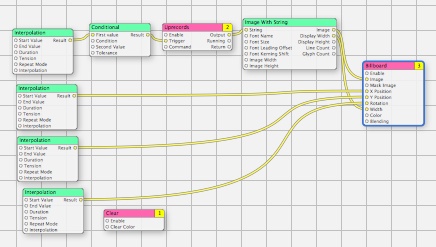
I am not all that big about screen savers, what with the fact they don’t save screens any more. On the other hand, it can be a good warning that the screen is about to turn off if you do not actually want it to. As such, a nice simple screen saver can still be useful. Blanking to black is fine, but why not make it a little nice? For a couple of years (at least), I have used a screen saver called ShowOff . The whole purpose is to keep track of your best uptime, and shows your current uptime. There are a lot problems with it, though: It has not been updated since January of 2006. It only records uptimes when the screen saver is running Editing the font requires hand-editing the plist file. It occasionally records a random value, thus making it useless. To handle the last problem, I have been keeping a copy of the preferences and using it to replace the wrong one. Sufficed to say, this is less than optimal. So I decided to go about and make my own. I do have a goal of learning Obje...